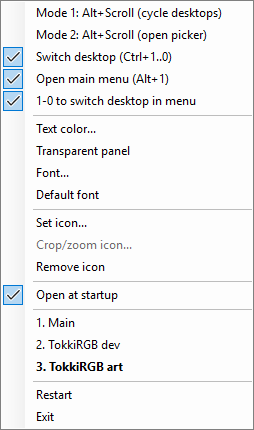
Windows hides your virtual desktops; VD Jump puts them back in sight.
See the current desktop on your taskbar, name every workspace, and jump straight to the one you need.
Stay oriented
Current desktop name stays visible on the taskbar.
Name each desktop by task, client, or mood.
Add color, icon, and font choices so every desktop looks distinct.
Jump faster
Press Ctrl+1-9 to switch directly to any desktop.
Open a quick desktop menu with Alt+1 and pick by number.
Hold Alt and scroll to flip desktops with the mouse.
 VD Jump
Instant Virtual Desktops Solution
VD Jump
Instant Virtual Desktops Solution